Set up the locations first
Create full customer details, a main address and additional sites before booking a job. Keep access information with the right premises.
Cookie preferences
Necessary cookies keep ServiceFlow working. With your permission, analytics cookies help us understand website visits. You can change this choice later.
ServiceFlow
Run jobs, staff and customers from one place. Schedule the work, guide your field team and give customers a clear record of the result.
30-day free trial No card required Up to 5 users
Site assessment / Tuesday, 09:00
Team assigned. Job-specific RAMS attached.
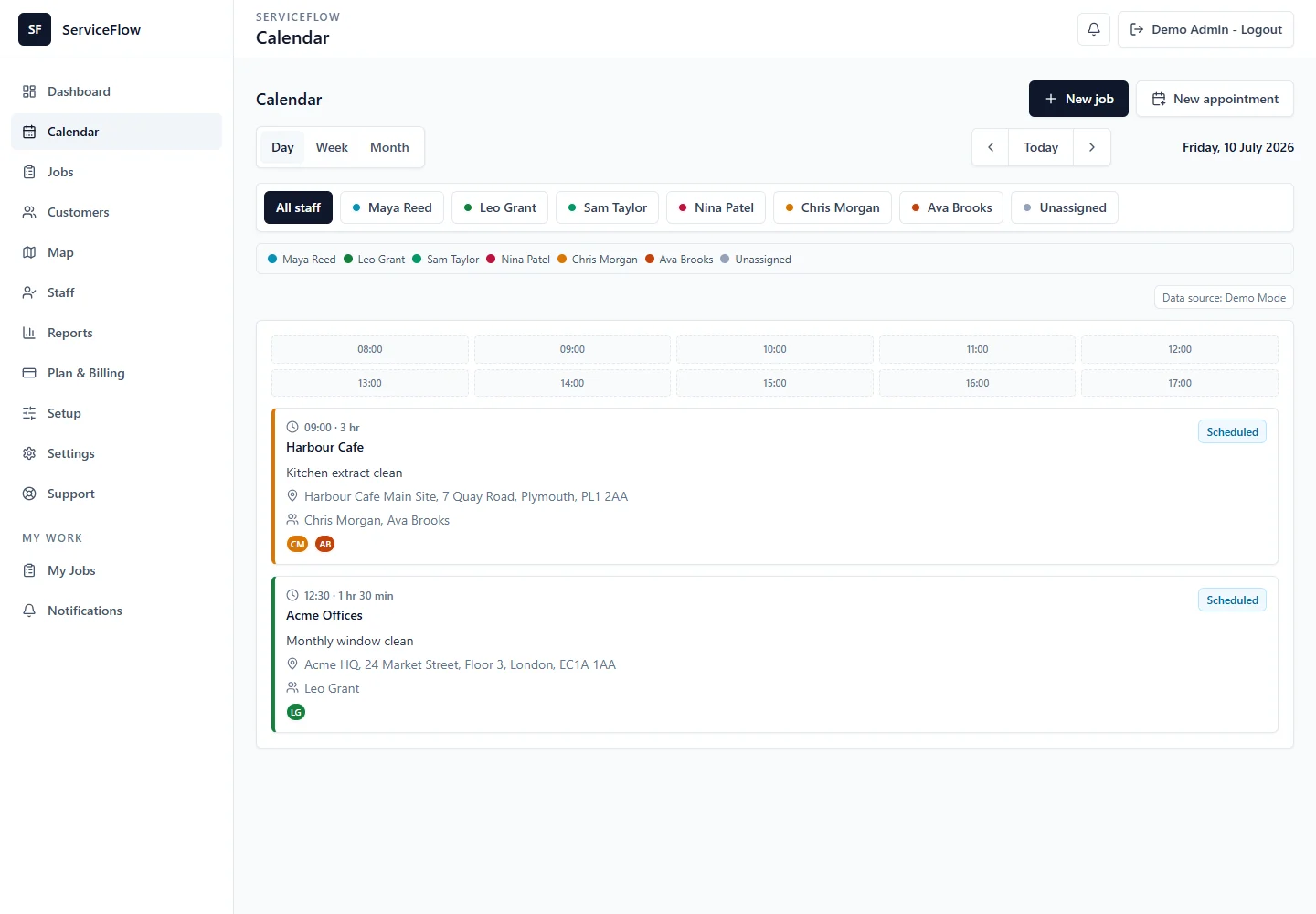
Schedule work
Manage staff
Capture job evidence
Keep customers updated
How ServiceFlow works
A clear handover at every step. Everyone works from the same job record.
Choose the customer, site, date and instructions.
Check availability and send work to the right people.
Staff see their jobs and update progress on their phones.
Keep photos, form answers and signatures with the job.
Give customers access to approved reports and documents.
Take a closer look
See the day's work, check your team and plan one-off or recurring visits in the same calendar.
Explore schedulingStaff have the site details, instructions and next action on their phones, from travelling to the job through completion.
Explore the staff appInstall ServiceFlow with your company logo as the app icon. Your business branding carries through the app experience for staff and customers.
Explore business branding
Standard icon
Your logo
Search completed work by customer or staff member. Review reports and their photos before choosing what to share.
Explore job reportsGive selected contacts a business-branded place for visits, reports, documents and agreements requiring attention. Set permissions for the customer or site.
Explore the customer portalSend a PDF to selected portal contacts. Capture active acknowledgement and retain the agreed document, rather than replacing accepted terms in place.
Explore customer agreementsAction required
Northfield House · Version 1
Review the document and actively confirm your acceptance.
Less searching. More clarity.
Those tools can get a business started. As the team grows, it becomes harder to know which message has the latest instructions, where the photos went or whether a report was sent.
ServiceFlow gives each visit a home. The booking, staff instructions, access notes, photos, forms and reports stay attached to the right customer and site. The next person can pick up the job without piecing it together.
Explore job management01 / On site
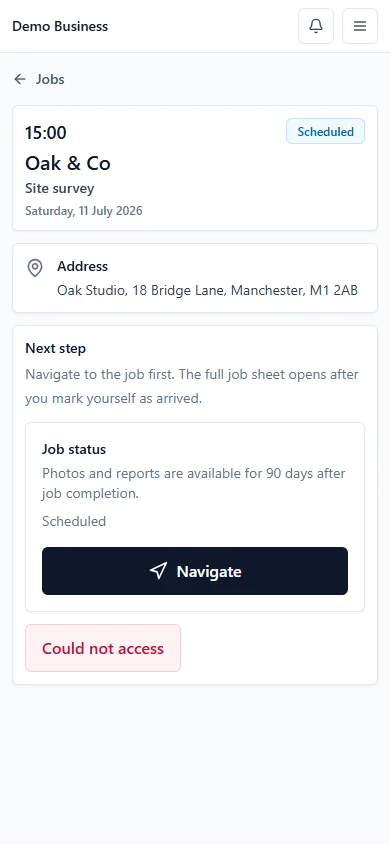
Today's jobs, access instructions and the next action. Staff move from On Way to Arrived, complete their forms and leave a useful record.
Take photo and Choose from device are separate actions. Large phone images are prepared for upload automatically, with unnecessary camera metadata removed.
Job forms, safety documents and internal recurring notes are there for the person doing the visit, including a colleague covering the next one.
Supported drafts and processed photos can queue on the device for later sync. Initial access and some actions still need a connection.
02 / With the customer
Give customers a business-branded portal for upcoming visits, completed reports, shared documents and agreements that need attention.
Upload a PDF and choose the customer contacts who should receive it. They can view, download or print it, then actively confirm acceptance. You can review the recipient and acceptance details.
Accepted documents aren't silently replaced. Send a new agreement when terms change, keeping the previous record intact. This is customer acknowledgement, not a handwritten signature.
Action required
Northfield House · Version 1
Review the document and actively confirm your acceptance.
03 / The finished record
Bring photos, form answers and products used into a customer-safe report. Include the relevant shared safety documents and deliver a readable PDF through the portal.
Add your business logo and multiple authorised credential or accreditation logos. Set their order, switch each one on or off, and add reference numbers or verification links where useful.
Explore branded reportsService report / Northfield House
Illustrative layout. Businesses provide their own authorised credentials; no accreditation is implied.
Every site. Every next visit.
Create full customer details, a main address and additional sites before booking a job. Keep access information with the right premises.
Ongoing internal notes follow the recurring series. Edit or remove them as things change; keep one-visit instructions job-specific. Neither becomes customer-facing.
Choose safety documents for the individual job. Different work can carry different RAMS, separate from generic documents shared with a customer.
The tools behind the work
Book exact times or arrival windows, check staff availability and assign one person or a team. Set up recurring jobs once, then manage each visit or change future work as plans evolve.
Give your team a phone-friendly app for jobs and on-site updates. On supported devices, the installed app can carry your own company logo as its icon, with your branding throughout the app experience.
Capture before, during and after evidence, complete digital job sheets, record products used and collect required signatures. Build custom forms for your services and create branded customer-safe PDF reports.
Invite customers into a portal carrying your business name and logo. Share approved visits, reports and selected documents. Keep private office notes separate, with customer and site permissions controlling access.
Organise SDS, COSHH, RAMS, insurance and policies. Record staff document sign-off, toolbox talks, incidents and vehicle or equipment checks alongside everyday operations.
Built around service work
Whether your team visits homes, workplaces or managed properties, ServiceFlow connects the office to the people doing the work. Use the forms, instructions and records that make sense for your service.
Start with your next job
Try Starter with your own team. No card required. Choose a paid plan when you're ready.
Your starting point
£30/month
After your 30-day free trial
Up to 5 users · 2 admin + 3 staff
Start your 30-day free trialNo card required
Room to grow
£49/month
Paid plan · No free trial
Up to 8 internal users
Explore GrowthRoom to grow
£79/month
Paid plan · No free trial
Up to 20 internal users
Explore ProCompare all plan features and limitsStorage and photo retention
A connected record of your service
Good job management starts before someone arrives on site. Your office needs a reliable schedule, clear customer and site details, and a way to match the work to available staff. Your field team needs the latest instructions and a straightforward way to record what happened.
ServiceFlow brings these steps together for small and growing service businesses. Manage one-off bookings and ongoing contracts, keep staff assignments visible and track visit progress. Explore field service management or see how digital job sheets help staff complete consistent records.
A completed visit should leave more than a tick on the calendar. Keep submitted forms, job notes, products used, photos and reports connected to the customer and site. Find past work when a customer asks a question or the next visit needs context.
Approved reports and documents can be shared through the customer portal, while private information stays with the business. Photo retention and storage depend on the selected plan. Our product guides, Help page and retention information explain the workflow and its limits before you start.
Yes. Upload a PDF and send it to selected portal contacts. Each recipient reviews the document and actively confirms acceptance. ServiceFlow records who agreed to that document, and the agreed version remains available while portal access is permitted. This is acknowledgement, not a handwritten signature or a guarantee of legal enforceability.
Yes. Create the customer, main address and additional sites before any job exists. Keep site access details with each location, then select the appropriate site when scheduling work.
Job management software keeps bookings, people, instructions and completed work in one place. ServiceFlow connects the office, the team on site and the customer, so a job's schedule, photos, forms and approved reports stay together.
ServiceFlow is for service businesses that send people out to do one-off or repeat work. That includes cleaning, maintenance, facilities, property services, trades and contractors. You can choose job instructions and forms to suit your work; you do not need to fit one particular industry.
Yes. Staff can use the mobile-friendly web app to see assigned jobs, open directions, read instructions, update their status and complete job records. It can also be installed on supported phones. Supported offline drafts and queued actions sync when connectivity returns; an internet connection is still needed for initial access and some actions.
Yes, when you share them. The customer portal can show permitted visits, completed reports and selected documents. Customers only see the information shared with them. Private office notes and unshared records are kept separate.
Yes. Schedule daily, weekly, fortnightly, monthly or custom repeat visits. Use an end date, a visit count or an ongoing schedule, and choose individual dates for work that does not follow a regular pattern.
Yes. Keep before, during and after photos against the job, add custom job forms and checklists, and collect signatures where required. You control which report content is customer-visible. Uploaded files and photo retention are subject to your plan's limits.
The Starter plan includes a 30-day free trial for up to 5 users: 2 admin users and 3 staff users. Try the workflow with your own jobs and team. Starter is £30/month after the trial if you choose to subscribe. Growth and Pro are paid plans without a free trial.
No. You can start the Starter trial without entering payment details. Payment details are needed when you choose to purchase a subscription.
Your next working day, connected
Set up your business, add your team and book your first job.
Start your 30-day free trial30-day Starter trial. No card required.